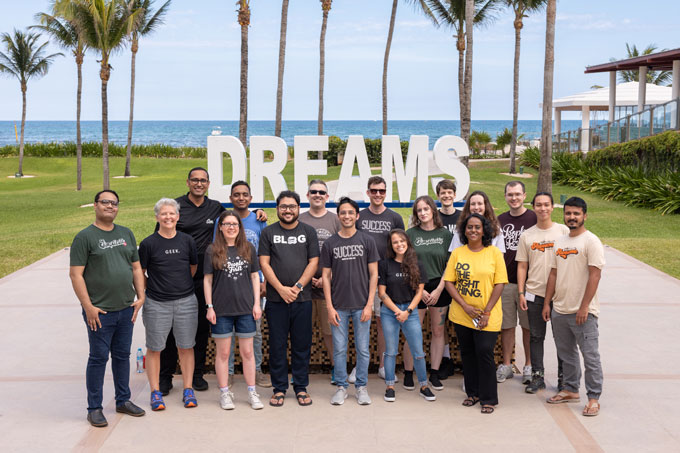
The most experienced team of WordPress experts and educators.
Over 16+ years of WordPress and web development experience.
The team that advises some of the largest WordPress plugins in the industry used by over 25 million websites.
Led by WPBeginner founder, Syed Balkhi, a well-respected WordPress expert.
Experience
Our editorial staff includes a dedicated team of programmers, writers, video creators, and editors with over 16 years of experience in WordPress, web hosting, eCommerce, SEO, and online marketing.
Our editorial team manages every piece of content we publish at WPBeginner. Unlike other copycat tutorial websites, every person in our team is a true WordPress practitioner. You can learn more about our Editorial Process here.
The team is led by the most well-known and well-respected WordPress expert in the world, Syed Balkhi. He graduated from University of Florida and have been building WordPress websites since 2006.
Syed is also the founder of some of the most popular WordPress plugins in the market.
About WPBeginner
WPBeginner is the largest free WordPress resource for beginners to learn WordPress. We are part of the Awesome Motive family and reach over 100 million visitors every year. Our content is fact checked and reviewed by our Editorial team for accuracy and integrity. You can learn more about us and our editorial process.
If you run a WordPress site, then you know that spam is a real annoying problem whether it comes to contact forms, WordPress comments, or user registrations. The good news is that stopping spam in WordPress is a lot easier than you probably think, and… Read More »
Welcome to the June edition of WPBeginner Spotlight! If there is one story this month, it’s AI becoming more integrated into WordPress. With the new WordPress Abilities API catching on fast, your favorite plugins are letting assistants like Claude and ChatGPT actually do the work… Read More »
If you love WordPress and rely on WPBeginner for tutorials, tips, and guides, then we want to show you an easy way to make sure you can easily find WPBeginner tutorials when you search on Google. Google search offers a feature called ‘Preferred Sources.’ This… Read More »
Welcome to this month’s WPBeginner Spotlight! May has been a big month for the WordPress ecosystem. The headline is the long-awaited release of WordPress 7.0 “Armstrong,” but it’s far from the only news. This issue is also packed with a fresh wave of AI-powered tools… Read More »
WordPress 7.0 is finally here 🥳, and we’ve been testing it since the early beta. It’s the first major release of 2026, and it’s a big one, with a brand-new AI Connectors screen, responsive block controls, and a refreshed admin experience that makes the dashboard… Read More »
If you woke up to news that StellarWP is being dissolved as a brand, you probably have questions. Back in 2021, hosting company Liquid Web (the same parent that owns Nexcess) launched StellarWP as an umbrella brand to bring together a growing portfolio of WordPress… Read More »
Since the early days of WordPress, Contact Form 7 has been helping website owners add simple forms to their sites. If you’ve trusted it on your own site, then you made a perfectly reasonable choice that millions of other site owners have made, too. But… Read More »
WPVibe launched on WordPress.org, and with it, something genuinely new: the ability to manage your entire WordPress site through a simple conversation with AI. No dashboard, no switching tabs. Just tell Claude or ChatGPT what you want done, and it happens. That’s the headline, but… Read More »
Welcome to Issue 22 of WPBeginner Spotlight! March was full of exciting developments in the WordPress industry. In this issue, we are celebrating a massive decade-long milestone for one of our favorite WordPress form builders and exploring exciting new AI tools designed to put your… Read More »
Welcome to another exciting edition of the WPBeginner Spotlight! February 2026 has been an incredible month for the WordPress community. WordPress 7.0 Beta is available for testing, with the first major admin redesign in years, along with built-in AI infrastructure and long-awaited collaboration features. There… Read More »
Used to store interaction and conversion data for campaigns in conjunction with Revenue Attribution.
1 year
_gat_omTracker*
Set, controlled and used by Google Analytics to collect and store data and then send that data to Google Analytics. OptinMonster provides the name if there is no existing tracker found on that page.
-
omCountdown-{id}-{elementId}
Used for countdown elements {elementId} in campaigns {id} to determine when it should complete.
-
om-{id}-closed / omSlideClosed-{id}
Used specifically with slide-in campaigns {id} to determine if it has been closed or not by a visitor.
30 days
om-success-cookie / omSuccessCookie
Used to determine if a visitor has successfully opted in to any campaign on your site to unlock content when using our Content Locking feature.
365 days
om-success-{id} / omSuccess-{id}
Used to determine if a visitor has successfully opted in to a campaign with the ID of {id} on your site.
365 days
omSeen-{id}
Used to determine if a visitor has been shown a campaign by the slug.
30 days
om-{id}
Used to determine if a visitor has interacted with a campaign ID of {id} on your site.
30 days
_omappvs
Used to determine when a new visitor becomes a returning visitor.